

Escape VMware. Migrate to Proxmox
— Without the Pain.
MultiPortal Migrator is a purpose-built migration tool that orchestrates the end-to-end movement of virtual machines from VMware to Proxmox, handling the complexity so your team doesn't have to.
VMware Migrations Are Painful — and Everyone Knows It
Broadcom's acquisition of VMware has forced service providers and enterprises to rethink their virtualisation strategy. Moving to Proxmox is the obvious answer — but the migration itself is where most projects stall.
Manual VMware-to-Proxmox migrations involve dozens of repetitive, error-prone steps: disk format conversion, storage controller changes, VirtIO driver injection, NIC remapping, IP reconfiguration, and guest agent installation. Multiply that across hundreds of VMs, across both Windows and Linux, and you've got a project that consumes your engineering team for months.
MultiPortal Migrator was built to solve this.
What Is MultiPortal Migrator?
Orchestrated VM Migration from VMware to Proxmox
MultiPortal Migrator connects the layers of a VMware-to-Proxmox migration into a single, coordinated workflow. Rather than manually executing each step for every VM, the tool automates disk conversion, driver injection, network reconfiguration, and post-migration validation — then imports the migrated VMs directly into your MultiPortal-managed environment.
Built by the same engineering team that runs production Proxmox infrastructure at scale, the Migrator addresses the real-world gotchas that generic tools miss: vSAN storage incompatibilities, SCSI controller driver issues on Windows, NIC name changes on Linux, and more.
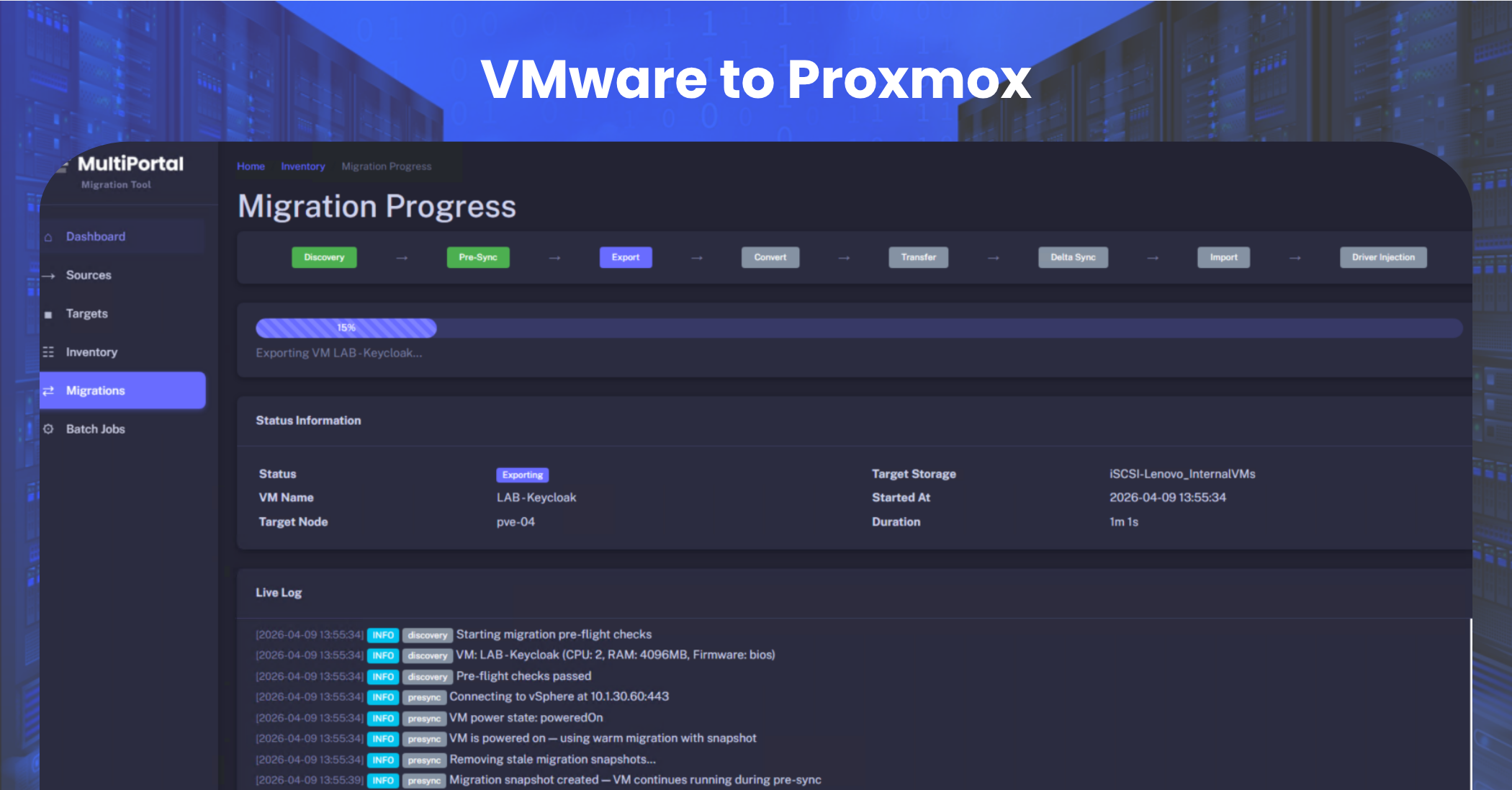
Eight-Stage Migration Pipeline
Every step orchestrated automatically — no manual intervention required
Key Capabilities
End-to-end automation for complex migrations
Warm Migration — Minimal Downtime
Your VMs stay powered on and running while the initial data gets exported and transferred. Only the final cutover requires downtime — minutes instead of hours per VM.
Batch Migration for Mixed Environments
Migrate Windows and Linux VMs in the same batch. The tool detects the OS type and applies the correct preparation steps — VirtIO driver injection for Windows, guest agent installation for Linux — automatically.
Automated Driver & Guest Agent Handling
The #1 cause of failed migrations is missing drivers. Migrator automates VirtIO driver injection (including the SCSI workaround for Windows VMs) and installs the QEMU guest agent, so every VM is fully functional on first boot.
Automated Storage Controller Conversion
VMware VMs default to SATA disks after import. Migrator handles the conversion to VirtIO SCSI — including the Windows recovery mode driver load process that normally requires manual intervention.
Automated IP & Network Reconfiguration
NIC hardware changes break static IP configs. Migrator uses cloud-init (Linux) and cloudbase-init (Windows) to automatically reconfigure network interfaces — no manual console access required.
Manual Cutover Option
Choose between automated and manual cutover for each VM. Complete bulk data transfer in advance, then trigger final cutover individually — enabling staged migrations with controlled downtime windows.
Test Mode — Validate Before You Cut
Boot migrated VMs on Proxmox with network interfaces disabled. Validate that the OS boots, applications load, and services start before connecting to production networks. Reduce migration risk to near zero.
Direct MultiPortal VDC Integration
Migrated VMs are injected directly into tenant Virtual Data Centres (VDCs) via the MultiPortal API. No manual import — VMs land in the correct tenant with the correct network and storage policy assignments.
vSAN-Aware Pre-Migration
VMware VMs on vSAN storage cannot be directly converted. Migrator detects vSAN-backed VMs and handles the necessary pre-migration storage move to compatible storage before conversion begins.
Supported Platforms
Source Platform
VMware vSphere / ESXi
Target Platform
Proxmox VE (managed via MultiPortal)
Supported Guest Operating Systems
Windows
- Windows Server 2022, 2019, 2016, 2012 R2, 2012
- Windows Server 2008 R2, 2008, 2003 (extended)
- Windows 10, 11
- Windows XP (legacy support)
Linux
- Ubuntu (all supported LTS releases)
- Debian
- Red Hat Enterprise Linux (RHEL)
- CentOS / CentOS Stream
- Rocky Linux / AlmaLinux
- Fedora
How It Works
Five steps from VMware to production on Proxmox
Connect
Point the Migrator at your VMware environment (ESXi host or vCenter) and your target Proxmox cluster. The tool discovers available VMs and presents them for selection.
Prepare
Select VMs for migration. The Migrator analyses each VM's OS, storage layout, and network configuration, then builds a migration plan. For Windows VMs, it handles VirtIO driver pre-installation. For vSAN-backed VMs, it orchestrates the pre-migration storage move.
Migrate
Bulk data transfer begins. Disk images are converted and transferred to Proxmox storage. Storage controllers are remapped to VirtIO SCSI. Network interfaces are reconfigured. Guest agents are installed.
Validate
Use Test Mode to boot each migrated VM with the network disconnected. Confirm the OS loads, services start, and applications are functional — all without affecting your production VMware environment.
Cutover
When ready, trigger cutover for individual VMs or in batches. The VM is powered down on VMware, a final incremental sync is performed, and the Proxmox VM is brought online with full network connectivity. The VM is automatically imported into the designated MultiPortal tenant VDC.
Migration Progress
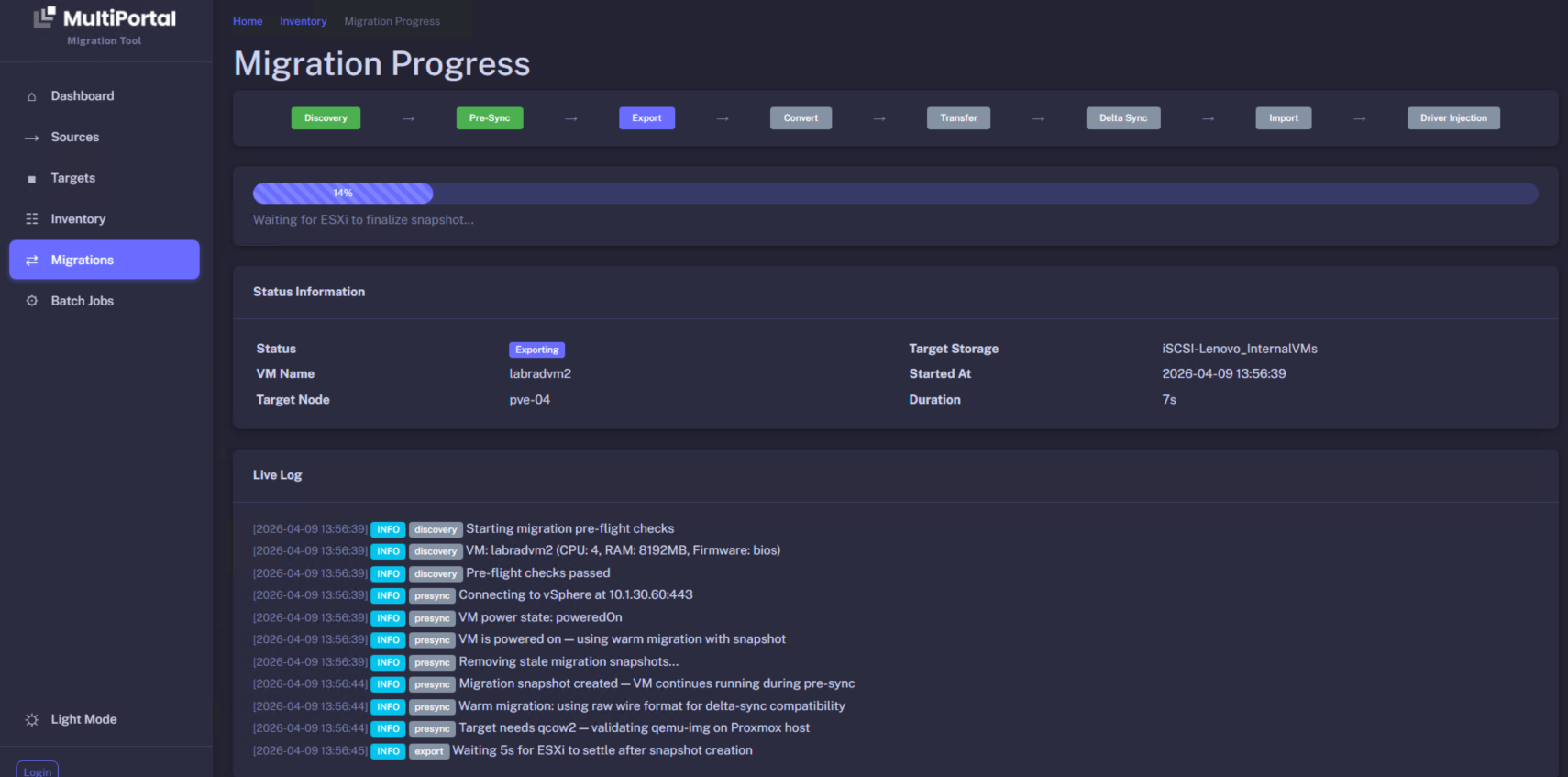
Batch Overview
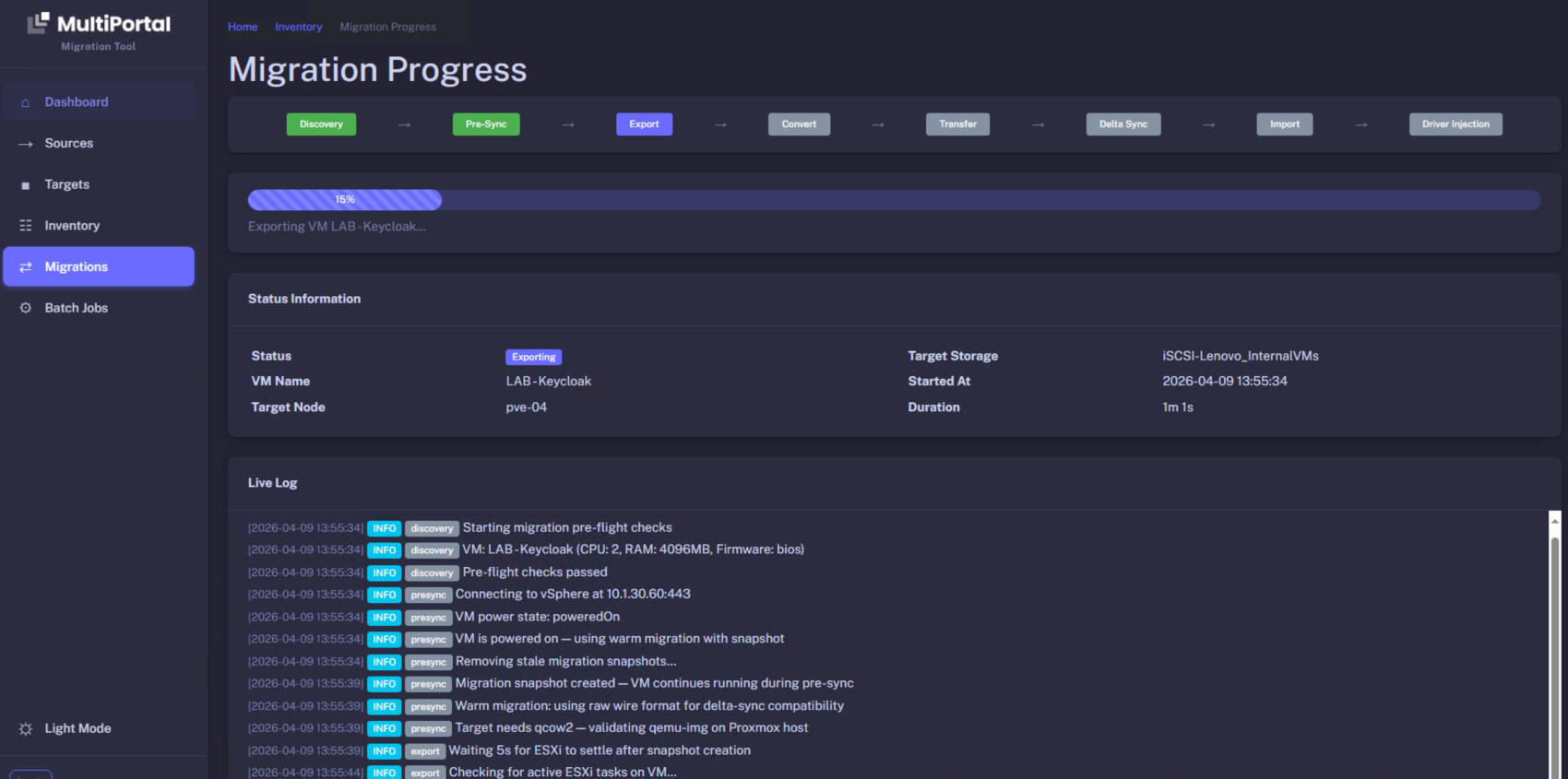
Built-In Safety & Rollback
Migration confidence through multiple safety layers
Source VMs Untouched
Your VMware VMs remain running and unchanged throughout the process. Switch back at any time.
Pre-Flight Validation
Environment readiness checks run before migration begins — catch issues before they cause problems.
Automatic Cleanup
Stale migration snapshots are automatically removed. No orphaned resources left behind.
Complete Audit Trail
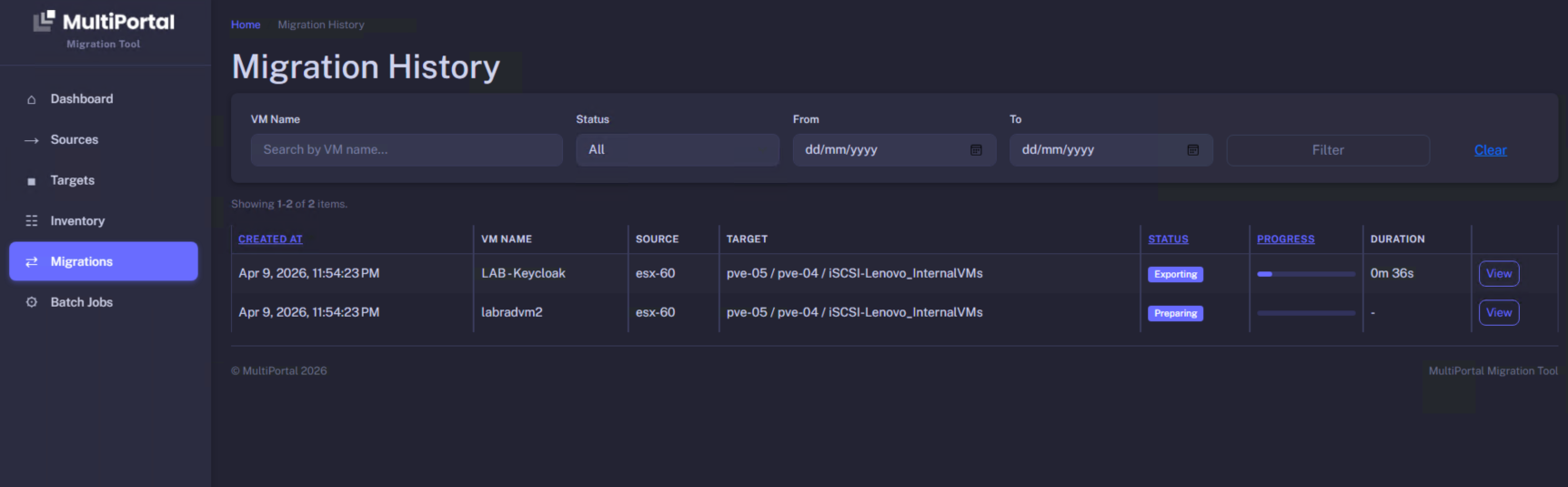
Migration History with searchable logs. Know exactly what happened, when, and to which VMs.
Migration History
Why MultiPortal Migrator?
Built for Service Providers
Unlike generic migration tools, MultiPortal Migrator understands multi-tenancy. Migrated VMs land in the right tenant VDC with the right policies — not in an unmanaged Proxmox pool that requires hours of manual organisation.
Battle-Tested on Production Workloads
Developed and validated through real-world migrations of IaaS customer workloads — not lab demos. Every automation exists because our team hit the problem first.
End-to-End — Not Just Disk Conversion
Most migration tools stop at disk conversion. Migrator handles the full lifecycle: driver preparation, disk conversion, storage controller remapping, network reconfiguration, guest agent installation, boot validation, and MultiPortal import.
Included with Paid Subscriptions
MultiPortal Migrator will be included with paid MultiPortal subscriptions at no additional cost. Currently in closed beta — public beta launching soon.
What's Coming Next
Roadmap
Continuous Replication (PVE to PVE)
Ongoing synchronisation between Proxmox environments for disaster recovery and boot-from-replica scenarios.
Expanded Legacy OS Support
Extended testing across older Windows Server and Linux distributions.
Parallel Migration Streams
Migrate multiple VMs simultaneously to reduce total migration window.
Ready to Break Free from VMware?
MultiPortal Migrator is in closed beta and launching publicly soon. Whether you're migrating 10 VMs or 10,000, we want to work with you.
Included with paid MultiPortal subscriptions at no additional cost.