

Escape VMware. Migrate to Proxmox
Without the Pain.
MultiPortal Migrator is a purpose-built migration tool that orchestrates the end-to-end movement of virtual machines from VMware to Proxmox, handling the complexity so your team doesn't have to. Continuous replication keeps your workloads running until you cut over, with downtime as low as a few seconds.
VMware Migrations Are Painful, and Everyone Knows It
Broadcom's acquisition of VMware has forced service providers and enterprises to rethink their virtualisation strategy. Moving to Proxmox is the obvious answer, but the migration itself is where most projects stall.
Manual VMware-to-Proxmox migrations involve dozens of repetitive, error-prone steps: disk format conversion, storage controller changes, VirtIO driver injection, NIC remapping, IP reconfiguration, and guest agent installation. Multiply that across hundreds of VMs, across both Windows and Linux, and you've got a project that consumes your engineering team for months.
MultiPortal Migrator was built to solve this.
What Is MultiPortal Migrator?
Orchestrated VM Migration from VMware to Proxmox
MultiPortal Migrator connects the layers of a VMware-to-Proxmox migration into a single, coordinated workflow. Rather than manually executing each step for every VM, the tool continuously replicates each VM's disks to Proxmox VE using VMware changed-block tracking, and automates driver injection, storage controller conversion, network reconfiguration, and boot validation. Migrator is a separate tool from the MultiPortal platform, licensed on its own, and runs as an appliance inside your own infrastructure.
Built by the same engineering team that runs production Proxmox infrastructure at scale, the Migrator addresses the real-world gotchas that generic tools miss: SCSI controller driver issues on Windows, NIC name changes on Linux, and more.
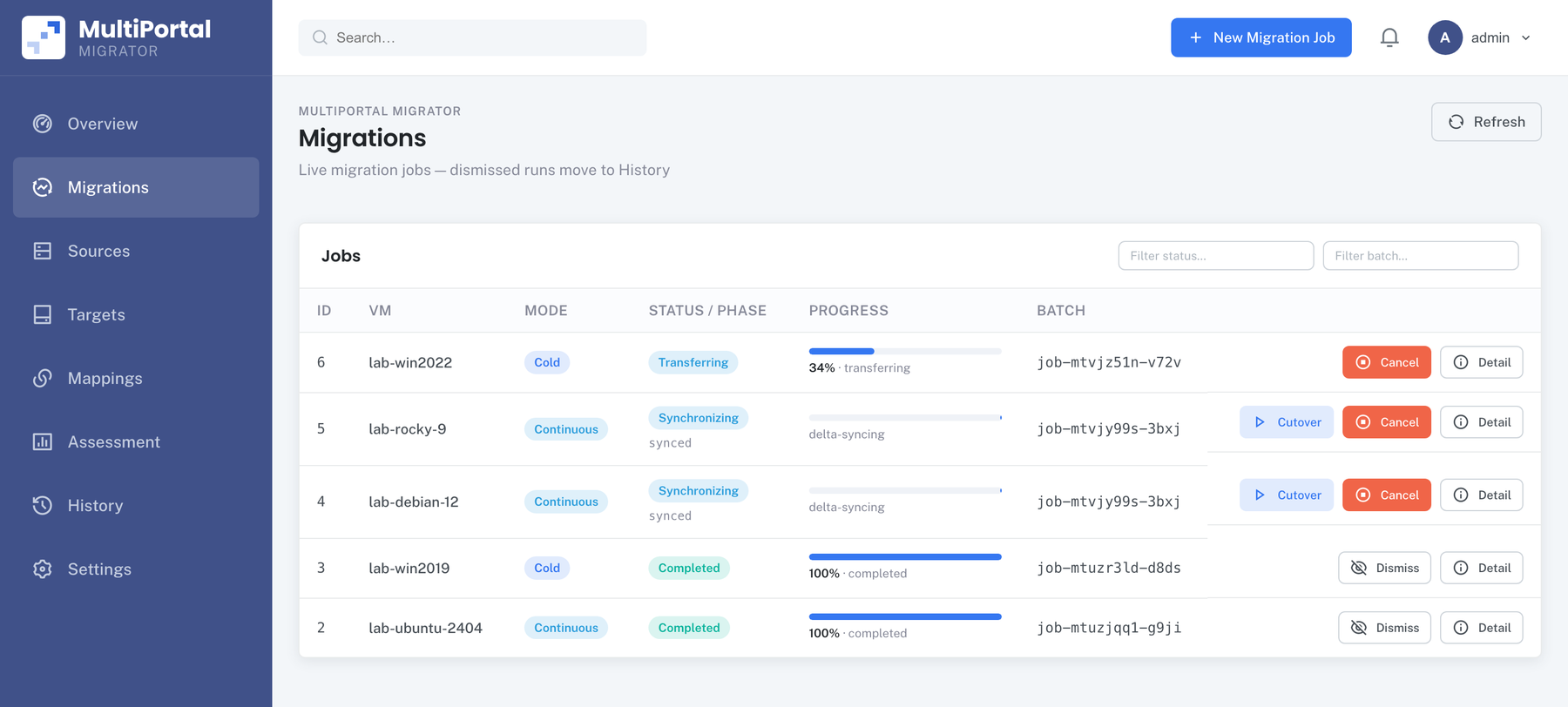
Five-Stage Migration Pipeline
Every stage orchestrated automatically, from discovery to a running VM on Proxmox VE
Key Capabilities
End-to-end automation for complex migrations
Continuous Migration: Downtime as Low as a Few Seconds1
Continuous replication uses VMware changed-block tracking to keep a Proxmox VE copy in step with the running source, for days if you need it, sending only the blocks that change. Your VMs keep serving traffic, nothing on the source is touched until you trigger cutover, and the cutover itself can take as little as a few seconds.
Batch Migration for Mixed Environments
Migrate Windows and Linux VMs in the same batch. The tool detects the OS type and applies the correct guest preparation at cutover: VirtIO driver injection for Windows, guest agent installation for Linux.
Automated Driver & Guest Agent Handling
The #1 cause of failed migrations is missing drivers. Migrator automates VirtIO driver injection (including the SCSI workaround for Windows VMs) and installs the QEMU guest agent, so every VM is fully functional on first boot.
Automated Storage Controller Conversion
VMware VMs default to SATA disks after import. Migrator handles the conversion to VirtIO SCSI, including the Windows recovery mode driver load process that normally requires manual intervention.
Automated IP & Network Reconfiguration
NIC hardware changes break static IP configs. Migrator automatically reconfigures the network interfaces on each migrated VM, with no manual console access required.
1. Cold migrations work with any supported target storage. Warm and continuous migrations, the low-downtime modes, need snapshot-capable target storage. Migrator checks this when you create the migration, so you find out at planning time, not at cutover.
Supported Platforms
Source Platform
VMware vSphere 8 (vCenter Server or ESXi)
Target Platform
Proxmox VE 9.x
Supported Guest Operating Systems
Windows
- Windows Server 2025
- Windows Server 2022
- Windows Server 2019
- Windows Server 2016
- Windows Server 2012 R2
Linux
- Ubuntu 22.04, 24.04
- Debian 12
- Rocky Linux 8, 9
- CentOS 7
How It Works
Four steps from VMware to production on Proxmox VE
Connect
Point the Migrator at your VMware environment (ESXi host or vCenter) and your target Proxmox cluster. The tool discovers available VMs and presents them for selection.
Plan
Select VMs for migration. The Migrator analyses each VM's OS, storage layout, and network configuration, then builds a migration plan. Nothing changes inside the guest yet: guest-level preparation waits until you trigger cutover.
Sync
The Migrator streams each VM's disks into Proxmox VE storage, then uses VMware changed-block tracking to keep the copy in step, sending only the blocks that change, for as long as you need. The source VM stays powered on and serving traffic, and nothing on the source is touched until cutover is triggered.
Cutover
When you're ready, trigger cutover. This is the first point at which the source VM is touched. The Migrator performs guest-level preparation (VirtIO drivers and network configuration), completes the final sync, and brings the VM online on Proxmox VE with full network connectivity. With continuous replication, downtime can be as low as a few seconds.
Migration Detail
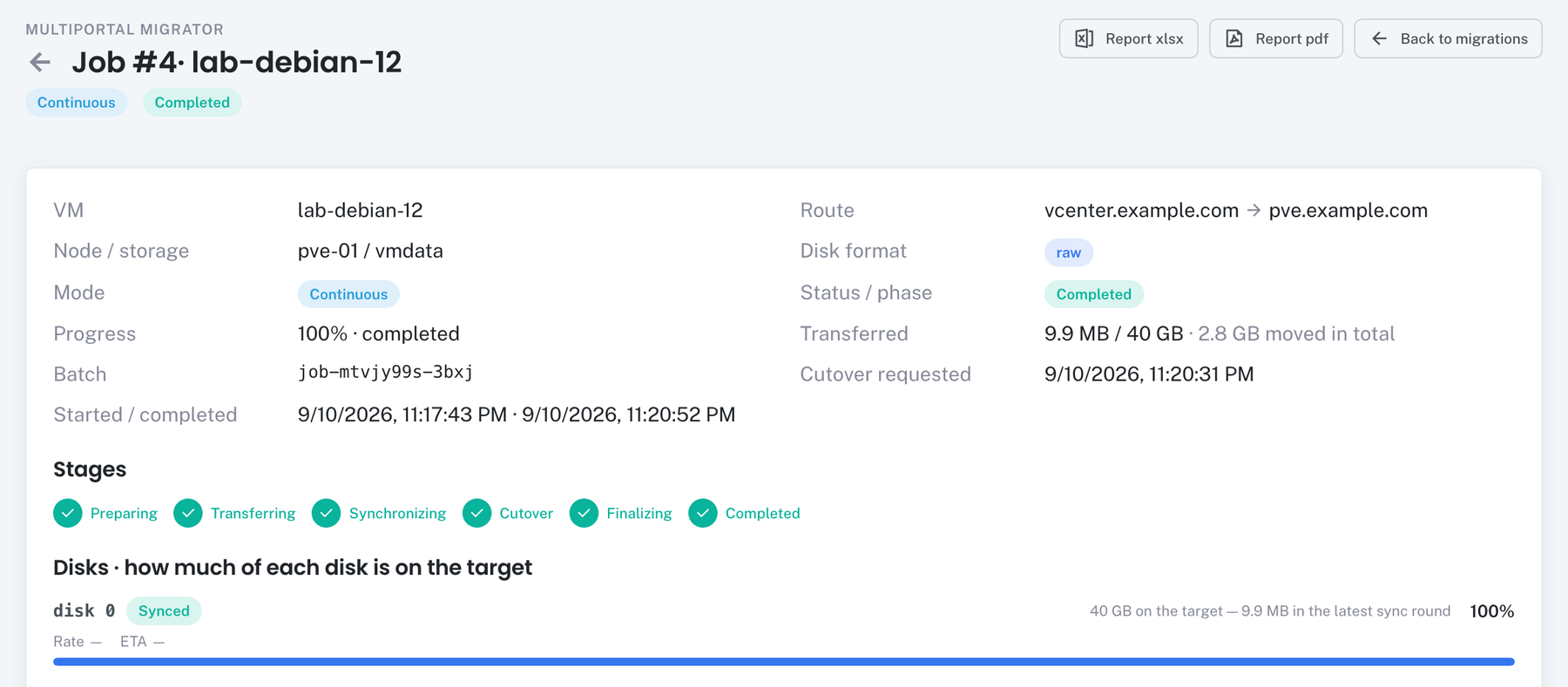
5 free VM migrations for every customer
Place an order for 5 VMs in our store at my.multiportal.io to claim them, then connect your VMware and Proxmox VE environments and move real workloads before you commit. Re-running a VM never uses another slot.
Built-In Safety & Rollback
Migration confidence through multiple safety layers
Source Untouched Until Cutover
Your VMware VMs keep running, unchanged, until you trigger cutover. If anything fails after the source powers off, the target is reverted and the source is powered back on. The source VM is never deleted.
Pre-Flight Validation
Environment readiness checks run before migration begins, so you catch issues before they cause problems.
Automatic Cleanup
Stale migration snapshots are automatically removed. No orphaned resources left behind.
Complete Audit Trail
Migration History with searchable logs. Know exactly what happened, when, and to which VMs.
Sync Rounds & Phase Timings
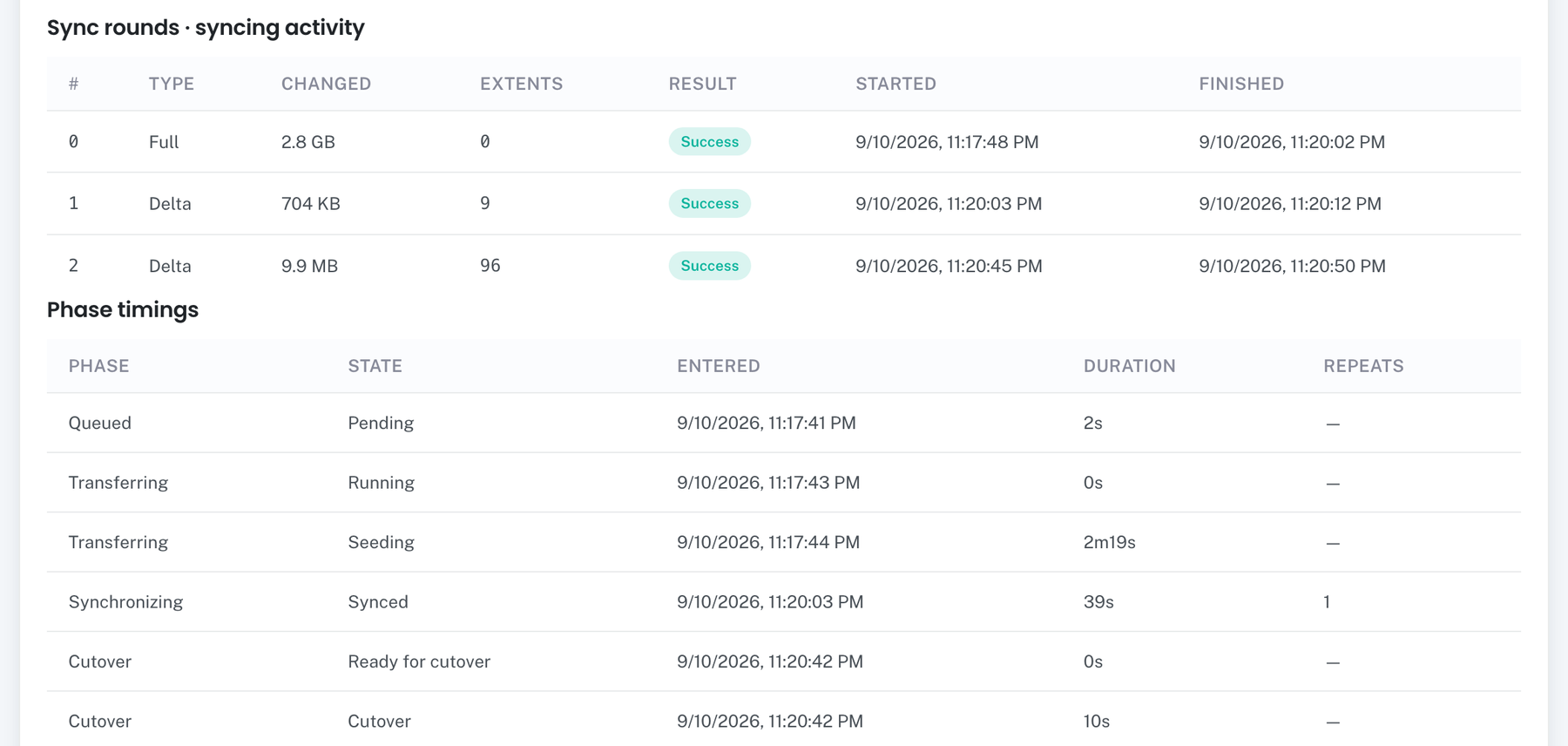
Lab run: a Debian 12 VM with a 40 GB disk moved 2.8 GB in total, then cut over in 10 seconds.
Why MultiPortal Migrator?
Cutovers as Short as a Few Seconds
Continuous replication keeps a Proxmox VE copy in step while your VMs keep serving traffic. The source isn't touched until you trigger cutover, and downtime can be as low as a few seconds.
Battle-Tested on Production Workloads
Developed and validated through real-world migrations of IaaS customer workloads, not lab demos. Every automation exists because our team hit the problem first.
End-to-End, Not Just Disk Conversion
Most migration tools stop at disk conversion. Migrator handles the full lifecycle: disk streaming, driver preparation, storage controller remapping, network reconfiguration, guest agent installation, and boot validation.
Ready to Break Free from VMware?
Every customer gets 5 free VM migrations: order 5 VMs in our store to claim them. Whether you're migrating 10 VMs or 100,000, MultiPortal Migrator gets them running on Proxmox VE with cutover downtime as low as a few seconds per VM.