
QinQ Zone Import: Bring Carrier-Grade Networks Under Management in MultiPortal 1.2.0
A first look at QinQ zone import, coming in MultiPortal 1.2.0: import existing QinQ zones from Proxmox SDN, validate them, and assign them to tenants through a simple three-step wizard.
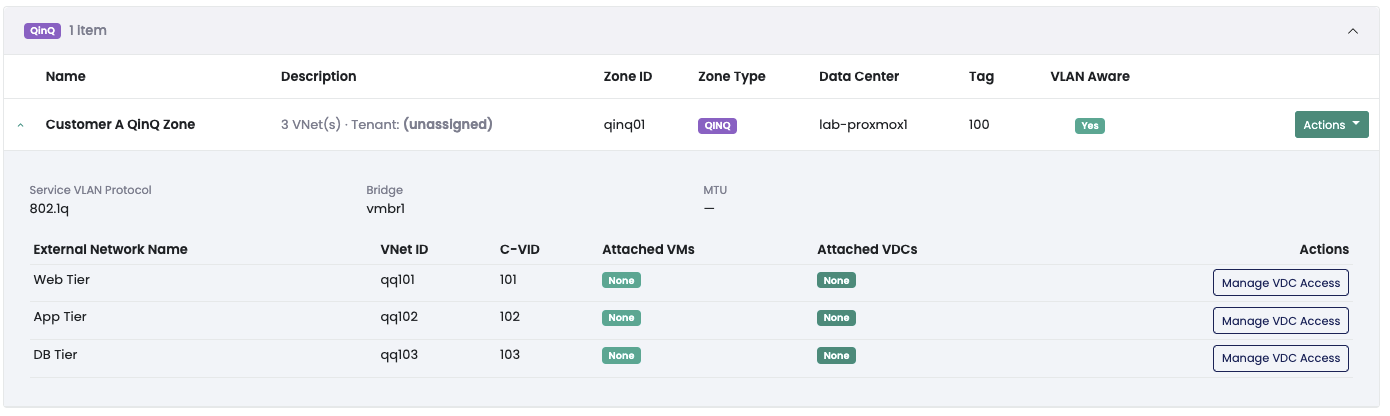
One of the features we are most excited about in the upcoming MultiPortal 1.2.0 release is QinQ zone import, and we wanted to give you an early look. If you have been running QinQ networks in Proxmox and wishing you could manage and sell them through MultiPortal like everything else, this one is for you.
Here is the short version. You can take an existing QinQ zone from your Proxmox SDN, bring it into MultiPortal, validate it, and assign it to a tenant, all through a three-step wizard. Once it is in, your tenant just sees a network they can attach to their VDCs. They never see the QinQ machinery underneath.
Note: The screenshots in this post are from a pre-release build. The UI will keep changing ahead of the public release.
A quick refresher on QinQ
QinQ (the 802.1ad standard) lets you stack two VLAN tags on a frame instead of one. A service tag wraps each customer’s own VLAN space, so every customer gets a full range of VLANs to themselves and their traffic stays isolated from everyone else’s. It is the kind of clean L2 separation that scales to a lot of tenants, which is why carriers and large hosting platforms lean on it.
The catch, until now, was that QinQ lived in Proxmox and nowhere else. You could build the zones, but MultiPortal did not know about them. Assigning one to a customer and keeping track of who had what was a manual job done by hand.
Where this came from
This came straight from people already running QinQ in Proxmox. The networks worked fine, they just sat outside MultiPortal, so tenant assignment and VDC availability were manual and easy to get wrong. The ask was simple: let us pull these zones into MultiPortal, hand them to a tenant, and stay in control of the whole thing, without MultiPortal reaching into Proxmox and changing our config behind our back.
So that is exactly what we built.
How the import works
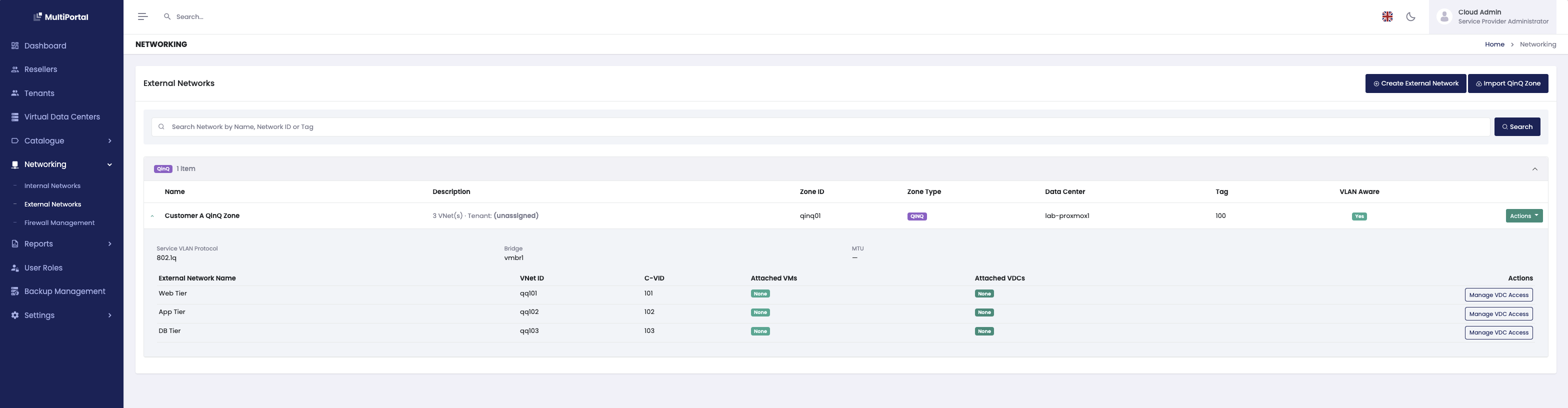
It starts with an Import QinQ Zone button on the External Networks page, and runs as a three-step wizard.
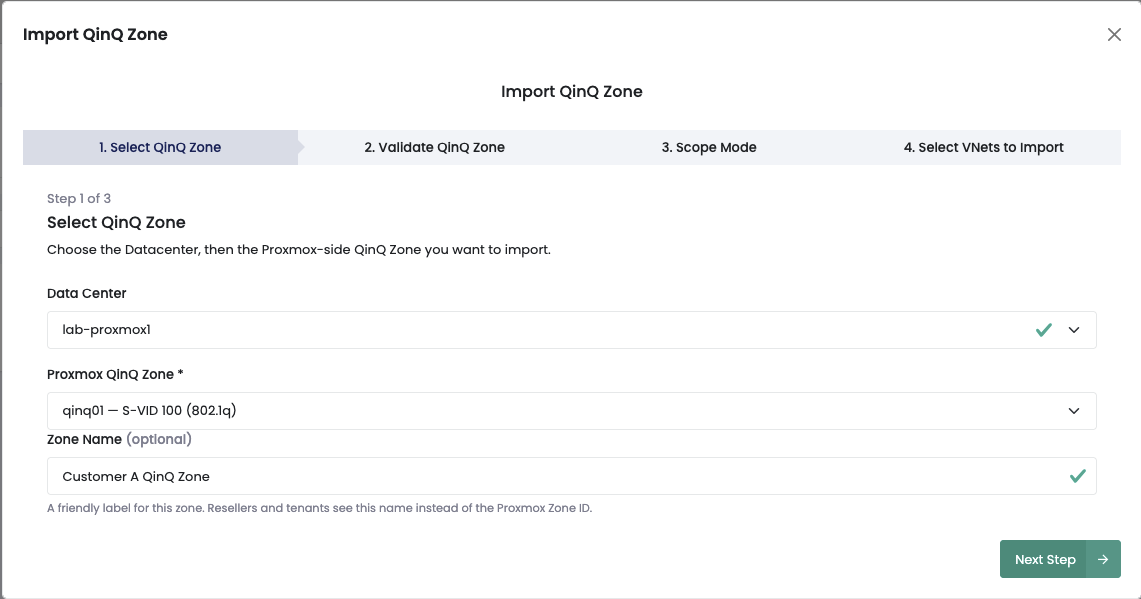
Step 1: pick the zone. Choose a datacentre to filter the list, then pick the zone you want to bring in. If a zone is not ready to import, say a bridge that is not VLAN-aware on one of your nodes, it shows up disabled with the reason right there. You find out before you try, not after something fails.
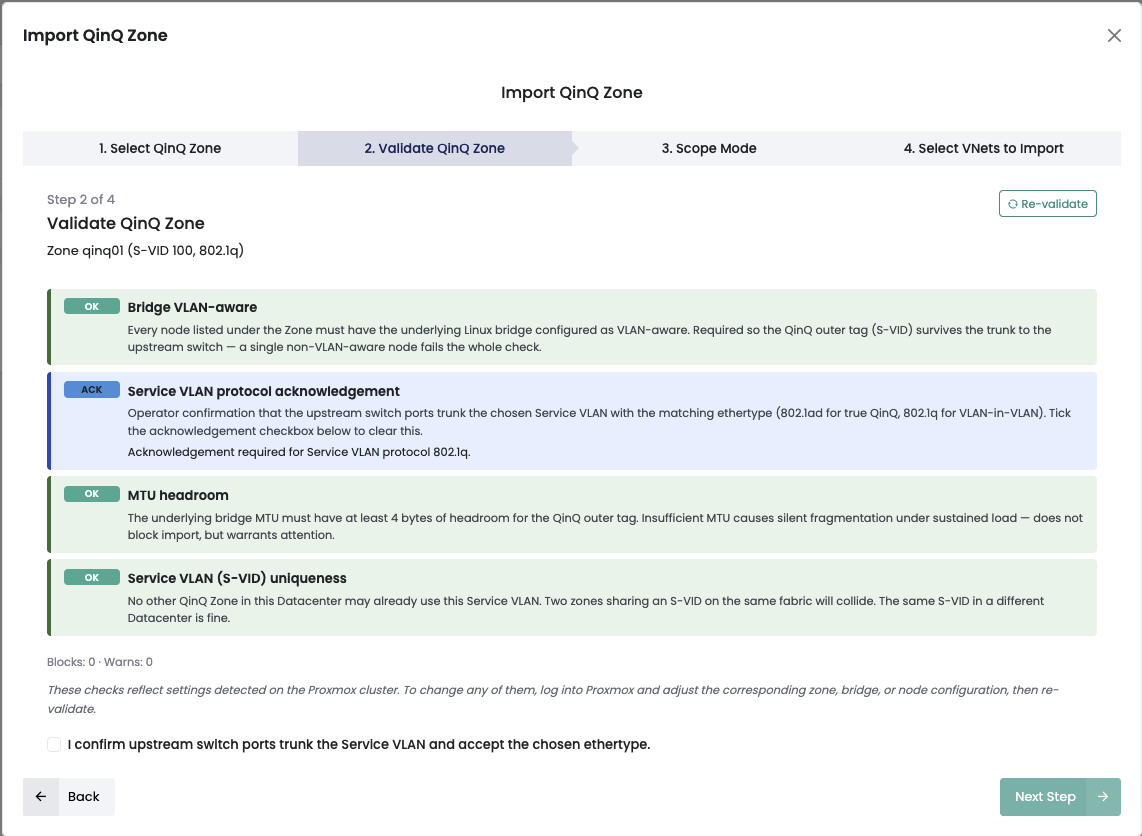
Step 2: validate and assign a tenant. MultiPortal runs its checks and you pick the tenant. The help text is clear about what happens next: every VNet you import shows up as an External Network on every VDC that tenant owns in the datacentre. For 802.1ad zones you tick a box confirming your upstream switch ports trunk the service VLAN and accept the ethertype, so nobody imports a zone the physical network is not ready for.
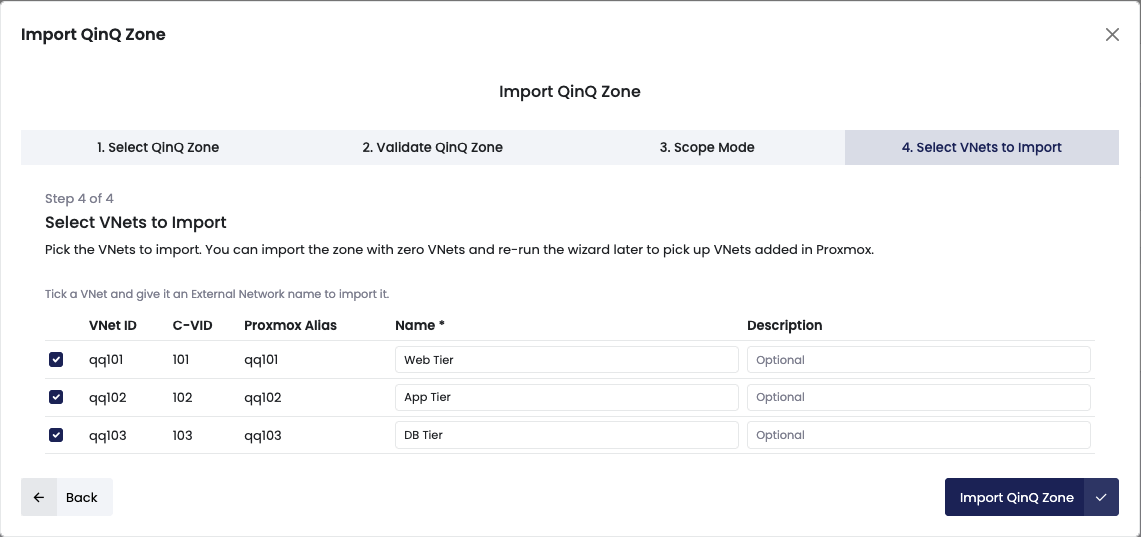
Step 3: pick the VNets. Select the VNets you want from the zone. You can also import an empty zone now and come back to the wizard later once you have added VNets on the Proxmox side. Save, and the new zone shows up in your External Networks list.
Managing zones after import
Your imported zones show up on the External Networks list as collapsible rows, with their child VNets indented underneath and a colour accent so they are easy to pick out from your standard VLAN networks. The assigned tenant and the VNet count sit right on the row.
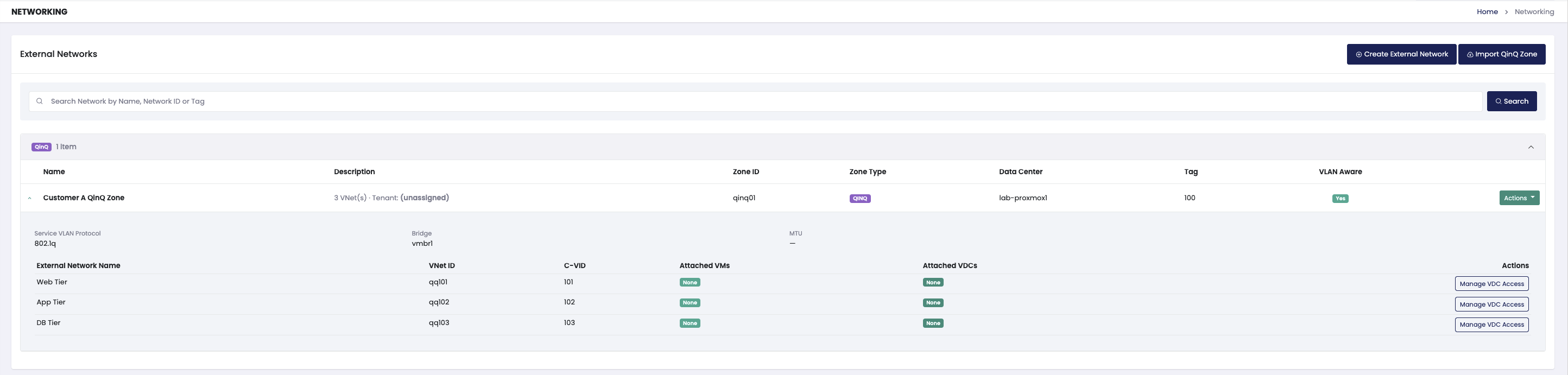
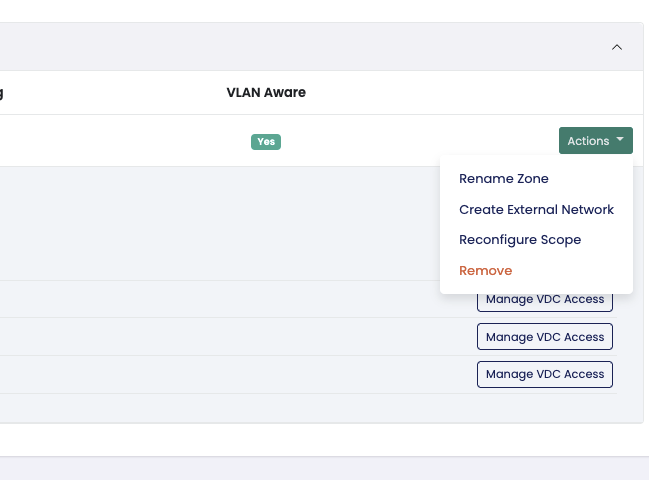
Open a zone and you get the full detail panel: the zone metadata (service VLAN, protocol, bridge, MTU, node scope), the current tenant, the child VNets with their customer VLAN tags and how many VMs are attached, and recent activity from the audit log. Three actions sit in the header:
- Re-validate re-runs the checks live without writing anything, so you can confirm a zone is still healthy after a change on the Proxmox side.
- Edit Tenant moves the zone to a different tenant. It is blocked while VMs are still attached through the current tenant’s VDCs, so you cannot yank a network out from under a running workload.
- Unimport removes the zone and its VNets from MultiPortal only. Your Proxmox zone is left completely alone, and unimport is blocked while any VM is still attached.
One thing we were strict about: MultiPortal never pushes a change to Proxmox and waits to see if it fails, and unimporting never deletes your Proxmox state. MultiPortal manages how the network shows up in the portal. Your actual SDN config stays exactly where you put it.
What it means for providers, resellers, and tenants
QinQ import touches all three tiers, in different ways.
Providers get a new thing to sell. QinQ gives a customer their own VLAN space without you running out of tags or mixing one customer’s traffic with another’s. That used to be a carrier-grade feature you delivered by hand. Now you import the zone once, assign it, and MultiPortal handles tenant visibility and VDC availability from there. If you run a cloud or hosting platform, it is a service you will be able to package up and put in front of customers once 1.2.0 lands. You also stay in full control: import, assignment, and the whole zone lifecycle are yours.
Resellers get the upside without the plumbing. Your resellers can see the External Networks their tenants are attached to, so they can support their own customers without calling you every time. They do not see the QinQ details underneath either, just the same clean External Network view their tenants get. In this first release the import and assignment stay with the provider, which keeps the network side safe, while resellers still get a service they can offer their own customers as part of their catalogue.
Tenants get the simplest version of all. To a tenant, a QinQ-backed network is just an External Network with a name and a state. The zone name, the service VLAN, the customer VLAN, the protocol, the MTU, the bridge, none of it is shown, and zone-level audit events are kept out of their view. They pick the External Network in their VDC like any other and it works. They get carrier-grade isolation and never have to think about it.
What’s next
QinQ import is the first step toward deeper SDN integration in MultiPortal. We are building out more SDN capability and a cleaner way of handling networking across the platform, and QinQ in 1.2.0 is where that starts. If you want the bigger picture, take a look at what’s coming in 1.2, 1.3 and 1.4.
Here is the important part for planning. The way QinQ works under the hood, and the way your tenants consume it, is stable. Zones, VNets, tenant assignment, and VDC availability behave the way they do today and will keep doing so. What will change in future releases is the operator UI and workflow as QinQ folds into a more unified SDN experience. So once it lands in 1.2.0 you can adopt it without worrying about the model shifting under you later.
Coming in 1.2.0
QinQ zone import is landing in MultiPortal 1.2.0. When it ships, you will find it on the External Networks page under Networking, with import and assignment handled by service-provider administrators.
This is just one piece of what is coming. For the full picture of where MultiPortal is heading, take a look at our roadmap for 1.2, 1.3 and 1.4. We will share more as the release gets closer.